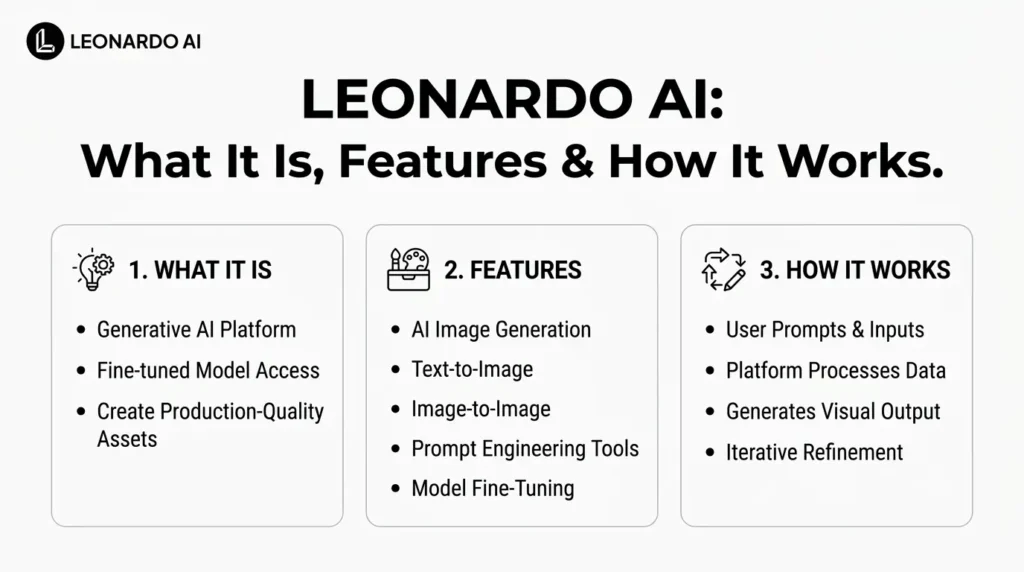
Leonardo AI is a generative AI creative platform for creating, editing, animating, and enhancing visual content. Instead of relying on a single image model, Leonardo Ai brings together its own models, third-party generative models, image and video tools, editing features, and creative workflows in one platform.
Users can generate images from text, transform existing images, create videos, edit visuals with natural-language instructions, remove backgrounds, upscale outputs, and experiment with different models and styles.
Leonardo Ai also offers tools for creators who need more consistency and control, including custom AI model training, image guidance, Elements, Blueprints, and Realtime Canvas.
Quick Summary
- Leonardo AI is an AI-powered platform for creating and editing images and videos.
- It offers multiple AI models, including Leonardo’s own models and third-party models.
- Key tools include image generation, video generation, Omni Editing, Flow State, Realtime Canvas, Image Guidance, and upscaling.
- Phoenix is Leonardo’s foundational image-generation model, focused on prompt adherence and image quality.
- Leonardo AI supports creators in marketing, design, gaming, content creation, branding, and product visualization.
- It offers a free plan with paid options that provide more tokens and advanced capabilities.
- Overall, Leonardo AI works as a complete visual AI workspace, rather than just an image generator.
What Is Leonardo AI?
Leonardo AI is an AI-powered creative platform designed primarily for visual content generation and production.
Its core workflow is relatively straightforward: you provide a text prompt or reference image, choose an appropriate model or let Leonardo select one, generate an output, refine it, and then export the finished result.
Unlike a basic text-to-image generator, Leonardo.Ai is structured more like a creative workspace. Its current platform includes:
- AI image generation
- AI video generation
- Image-to-image generation
- Image editing
- Background removal
- Image upscaling
- Realtime Canvas
- Flow State
- Blueprints
- Image guidance
- Elements
- Custom AI model training
- Multiple first-party and third-party models
- Developer API access
Leonardo.Ai became part of Canva in 2024, while continuing to operate as an independent platform with its own products and community.
How Does Leonardo AI Work?
Leonardo AI works by combining generative models with a set of tools that control how those models create or modify visual content.
At a basic level, the workflow looks like this:
Prompt or reference → Model selection → Generation → Refinement → Enhancement → Export
For example, someone creating a product advertisement could upload a product image, describe the desired environment, generate several compositions, edit the background, adjust specific elements, upscale the final image, and then download it.
1. Enter a prompt or upload an image
Users can begin with a written description or an existing visual.
Text-to-image generation is useful when starting from an idea, while image-to-image workflows are useful when the creator already has a sketch, photograph, character, product, or composition to work from.
2. Choose a model
Leonardo.Ai provides multiple models rather than forcing every task through one general-purpose system.
Its model library currently includes Leonardo’s own models alongside models from other providers.
The platform’s model selection includes image and video systems designed for different requirements such as prompt adherence, realism, typography, cinematic motion, editing, and consistency.
3. Generate and iterate
After generation, users can create variations, modify prompts, change references, or move into editing tools.
This iterative workflow is important because AI generation rarely produces the perfect final asset on the first attempt.
4. Refine and export
Leonardo provides tools for editing, upscaling, background removal, and other post-generation operations.
The result can then be downloaded for use in websites, social media, advertising, design projects, or other creative workflows.
What Are the Main Leonardo AI Features?
Leonardo AI has expanded beyond simple AI art generation.
Its current feature set covers much of the visual-production process.
a) AI Image Generation
The platform can generate images from text prompts across different visual styles, including illustrations, concept art, product imagery, photography, characters, environments, and marketing visuals.
Users can select different models depending on the desired output rather than treating every generation as the same type of task.
b) Image-to-Image
Image-to-image generation lets creators use an existing image as a starting point.
This can be useful for:
- Restyling artwork
- Developing concepts from sketches
- Creating alternative compositions
- Exploring different visual directions
- Maintaining elements from an existing reference
c) Omni Editing
Omni Editing allows users to modify generated images using natural-language instructions.
For example, a creator can ask the editor to change the color of an object, modify clothing, alter lighting, add elements, or place a product in another environment.
Leonardo introduced its Omni editing workflow with models including FLUX.1 Kontext and GPT Image, and the platform has since expanded its Omni model offering.
d) Realtime Canvas
Realtime Canvas is designed for interactive visual creation. Instead of waiting for a traditional generation workflow after every change, users can sketch or prompt while watching the visual evolve.
This makes it particularly useful for concept exploration and rapid visual experimentation.
e) Flow State
Flow State is Leonardo’s rapid ideation feature.
Rather than generating one small batch and stopping, users can continuously explore a stream of visual possibilities and select promising results for further iteration.
The feature also includes controls for Vibe, Lighting, Shot Type, and Color Theme, while the More Like This function can generate further variations based on an image the creator likes.
f) AI Video Generation
Leonardo Ai also supports video generation from text and images.
Its video ecosystem includes multiple third-party and platform models. Depending on the model, users can create image-to-video or text-to-video content, with some models supporting synchronized audio and other advanced capabilities.
The available model lineup changes over time. For example, Leonardo removed Sora 2 and Sora 2 Pro from its platform in July 2026 following a provider-side change, while recommending Veo 3.1 and Veo 3.1 Fast as replacements.
g) Background Removal
Leonardo can automatically isolate subjects and remove backgrounds, making it useful for product photography, advertising assets, thumbnails, and compositing workflows.
h) Image Upscaling
Upscaling tools increase the usable resolution and detail of generated images, which can be useful when preparing AI-generated visuals for websites, social media, presentations, or print.
i) Image Guidance
Image Guidance provides additional control over generation by allowing creators to influence the output with reference images and other visual information.
This is particularly useful when simple text prompting is not enough to maintain a desired composition, subject, or visual direction.
j) Elements
Elements can be used to influence generation toward particular visual characteristics or subjects. They are particularly useful when creators need greater consistency rather than relying entirely on a text prompt.
k) Blueprints
Blueprints provide predefined creative workflows that help users get started without building every generation setup manually.
They can be useful for repeatable creative tasks and faster experimentation.
Which AI Models Does Leonardo AI Offer?
One of Leonardo.Ai’s biggest differences from a single-model image generator is its model ecosystem.
The platform currently includes both Leonardo models and third-party models. Its model library changes as new systems are introduced or older systems are retired.
Some models currently highlighted by Leonardo include:
| Model | Main strength |
|---|---|
| Lucid Origin | Image generation, prompt adherence and text rendering |
| Phoenix | Leonardo’s foundational image generation |
| Grok Imagine 1.5 | Cinematic image-to-video generation |
| Seedance 2.5 | Video generation and camera control |
| FLUX 3 Video | Video generation with synchronized audio |
| Wan 3.0 | Video generation with audio and multiple input types |
| Motion 2.0 | Fast, controllable motion generation |
| Seedream 5.0 Pro | High-fidelity image generation and typography |
The exact model lineup can change, so users should check Leonardo’s current model library before choosing a model for a production workflow.
What Is Leonardo Phoenix?
Phoenix is Leonardo Ai’s own foundational image-generation model.
Leonardo Ai describes Phoenix as being designed for strong prompt adherence, image fidelity, and coherent text rendering. It is available in Phoenix 0.9 and Phoenix 1.0.
Phoenix is particularly relevant when a creator wants the generated image to closely follow a detailed prompt.
It can also handle text inside images more effectively than many older image-generation systems, making it useful for posters, advertisements, interface concepts, and other designs where typography matters.
What Is Leonardo Lucid?
Leonardo Lucid is a family of AI image-generation models available on Leonardo Ai. It includes Lucid Origin and Lucid Realism, designed for different image-generation needs.
These models transform text prompts into detailed visuals, from creative artwork to photorealistic images. Lucid Origin focuses on versatility and prompt accuracy, while Lucid Realism emphasizes cinematic realism.
They are useful for creating digital art, marketing visuals, concept designs, and other creative content.
Leonardo Lucid Origin vs. Leonardo Lucid Realism
Leonardo Lucid includes two models designed for different image-generation needs: Lucid Origin and Lucid Realism.
| Feature | Lucid Origin | Lucid Realism |
|---|---|---|
| Primary focus | Versatile image generation | Cinematic, realistic visuals |
| Visual style | Diverse styles, vibrant imagery | Natural lighting and realistic scenes |
| Prompt adherence | Strong prompt accuracy | Focus on cinematic results |
| Text rendering | Designed for clear text and graphic layouts | Primarily focused on realistic imagery |
| Best use cases | Concept art, posters, product mockups, social graphics | Cinematic portraits, atmospheric scenes, image-to-video workflows |
| Ideal for | Creators needing flexibility and control | Creators prioritizing realism and mood |
In short: Choose Lucid Origin for versatile designs and accurate prompt execution, and Lucid Realism for cinematic imagery with a realistic look.
What Are Omni Models in Leonardo AI?
Omni models are designed to understand both image and text inputs with greater contextual awareness.
Leonardo currently provides several Omni models, including models from the Nano Banana, FLUX, and GPT families.
The important distinction is that Omni models are not simply another image-generation preset. They can also power Leonardo’s editing workflow, allowing creators to provide references and describe changes using natural language.
For example:
Original image → Add reference → Describe change → AI edits image → Review → Refine
This makes Leonardo more useful as an editing environment rather than only an image-generation tool.
What Can You Use Leonardo AI For?
Leonardo AI can support a wide range of creative and commercial workflows.
1. Marketing and Advertising
Marketers can use it to create:
- Social media graphics
- Product advertisements
- Campaign concepts
- Website imagery
- Promotional visuals
- Thumbnail concepts
2. Product Visualization
A product photograph can be placed into different environments or creative concepts without producing an entirely new photoshoot for every variation.
3. Game Development
Game designers can use generative models for:
- Character concepts
- Environments
- Props
- Concept art
- Textures
- Visual development
4. Content Creation
Creators can generate artwork for:
- YouTube thumbnails
- Blog posts
- Social media
- Presentations
- Digital publications
- Storyboards
5. Branding and Design
Designers can experiment with different visual directions before committing to a final design.
For example, a brand team could generate several moodboards, explore color treatments, test product compositions, and then refine the strongest direction.
Is Leonardo AI Free?
Yes. Leonardo AI has a free plan, but free usage is limited.
As of October 2026, the free plan provides 150 Fast Tokens per day, while paid plans provide substantially larger monthly token allowances.
Current individual pricing is:
| Plan | Price | Fast Tokens |
|---|---|---|
| Free | $0/month | 150/day |
| Essential | $12/month | 8,500/month |
| Premium | $30/month | 25,000/month |
| Ultimate | $60/month | 60,000/month |
Prices shown are before applicable taxes and may change.
Premium and Ultimate plans also provide relaxed generation for selected models after the normal fast-token allocation is exhausted. The exact models covered by relaxed generation can change.
How Do Leonardo AI Tokens Work?
Tokens are Leonardo.Ai’s usage currency.
The number of tokens required depends on the operation. Image generation, video generation, upscaling, background removal, and other tasks can have different costs based on their computational requirements.
For example, generating a simple image does not necessarily consume the same number of tokens as a more computationally demanding operation.
Paid users can also use Token Rollover and purchase additional Top-up Tokens when available. Top-up tokens do not expire, although they require an active paid subscription.
Does Leonardo AI Offer Custom AI Model Training?
Yes.
Leonardo allows eligible users to train personal AI models using their own image datasets. The platform says users can typically upload around 10–20 images to train a model around a particular style, subject, or theme.
This can be useful when consistency matters.
For example, a creator could train a model around a particular visual style and then use it to produce a series of assets with a more consistent aesthetic.
Can You Use Leonardo AI Images Commercially?
Commercial rights depend on the user’s subscription and Leonardo’s current terms.
According to Leonardo’s current pricing information, paid subscribers retain ownership, copyright, and other intellectual-property rights in the images they generate. Free-tier users have different rights: Leonardo retains certain rights to use, reproduce, modify, and distribute their creations while granting users a non-exclusive, royalty-free commercial-use license.
Because licensing terms can change, businesses should check Leonardo’s current Terms of Service before using generated content in important commercial projects.
What Are the Limitations of Leonardo AI?
Leonardo AI is powerful, but it is not a substitute for professional creative judgment.
Important limitations include:
- Model quality varies: Different models perform better on different tasks.
- Token consumption varies: Complex image and video workflows can consume tokens quickly.
- Model availability changes: Third-party models can be removed or replaced.
- AI editing is imperfect: Small changes can sometimes affect unrelated parts of an image.
- Consistency still requires iteration: Characters, products, and scenes may require references and repeated refinement.
- Video generation can be expensive: High-compute video models can consume significantly more resources than basic image generation.
- Commercial rights require attention: Licensing differs by plan and should be checked before commercial deployment.
The platform itself notes that model availability can change because Leonardo occasionally retires models, including models provided by third parties.
Leonardo AI vs a Basic AI Image Generator
The biggest difference is workflow depth.
A basic AI image generator may primarily offer:
Prompt → Image
Leonardo is closer to:
Prompt/Image → Model → Generate → Edit → Guide → Iterate → Upscale → Animate → Export
That makes it more suitable for creators who want to develop a visual from an initial idea through multiple production stages.
Its model marketplace also means users can choose different systems rather than relying on one model for every task.
Who Should Use Leonardo AI?
Leonardo AI is particularly useful for:
- Beginners who want an accessible visual AI platform
- Digital artists experimenting with generative workflows
- Marketers creating campaign and advertising assets
- Content creators producing thumbnails and social visuals
- Designers exploring concepts and compositions
- Game developers building concept art and visual assets
- Businesses that need scalable visual production
- Developers who want to integrate image and video generation through an API
It may be less suitable for users who only need an occasional basic AI image and do not need advanced editing, model selection, or creative controls.
Final Thoughts
Leonardo AI has evolved from an AI image-generation platform into a broader creative production environment.
Its key advantage is not simply the ability to turn prompts into images. The platform combines image generation, video creation, AI editing, model selection, image guidance, Realtime Canvas, Flow State, upscaling, background removal, custom model training, and API access in one workflow.
For beginners, it provides an accessible way to experiment with generative visuals. For professional creators and marketers, its combination of models and editing tools makes it more useful for repeatable production workflows.
As Leonardo continues adding models and retiring older ones, the platform’s specific capabilities will continue to change. The best approach is therefore to treat Leonardo AI as a flexible creative ecosystem rather than a single AI model.
Frequently Asked Questions
1. What is Leonardo AI used for?
Leonardo AI is used to generate and edit images, create AI videos, develop concepts, upscale visuals, remove backgrounds, and build consistent creative assets for design, marketing, gaming, content creation, and other workflows.
2. Is Leonardo AI free?
Yes. Leonardo AI has a free plan with 150 Fast Tokens per day. Paid plans provide larger monthly token allowances, private generations, additional features, and access to higher-volume workflows.
3. Is Leonardo AI better than other AI image generators?
There is no universal winner. Leonardo’s main advantage is its combination of multiple models, generation, editing, guidance, video, upscaling, custom model training, and creative workflows in one platform.
4. What is Leonardo Phoenix?
Phoenix is Leonardo.Ai’s foundational image-generation model. It is designed for strong prompt adherence, visual fidelity, and coherent text rendering, and is available in Phoenix 0.9 and Phoenix 1.0.
5. Can Leonardo AI generate videos?
Yes. Leonardo.Ai supports multiple video-generation models and workflows, including text-to-video and image-to-video. Available models and capabilities change over time.
6. Can Leonardo AI images be used commercially?
Paid subscribers currently retain ownership and intellectual-property rights over generated images, while free users operate under different licensing terms. Always check the current Terms of Service for the specific commercial use case.
Also Read –
Leonardo AI Models: Complete Guide to Models & Capabilities
Leonardo AI Models: Complete Guide to Models & Capabilities
Leonardo AI Tools: Complete Guide to Creative AI Tools
Hi, this is a comment.
To get started with moderating, editing, and deleting comments, please visit the Comments screen in the dashboard.
Commenter avatars come from Gravatar.
Pingback: Leonardo Lucid Origin: Features, Capabilities and What It Can Create?
Pingback: Is Leonardo AI Free? Free Plan, Limits, Tokens & Paid Features
Pingback: Leonardo AI vs ChatGPT: Image Generation, Features, Pricing & Key Differences - Leonardo AI